API keys
Find the API keys page, mint and scope bearer tokens, call the REST API and CLI, and revoke keys.
API keys are bearer tokens that authenticate programmatic access to Queringo: the REST API, the CLI, and other integrations. You create them in your workspace settings, copy the secret once, and pass it on every request.
The REST API and CLI are available on the Scale plan and above. On lower plans the page shows an upgrade prompt and the Create key button is disabled.
How to open the API keys page
- Open Settings
In the left sidebar of the app, click the gear icon at the bottom to open Settings.
- Choose API keys
Under the "You" group in the settings sidebar, click "API keys". The page lives at
/app/settings/api-keys. - Open the in-app guide (optional)
The "View guide" button in the page header links straight back to this article if you need a refresher.
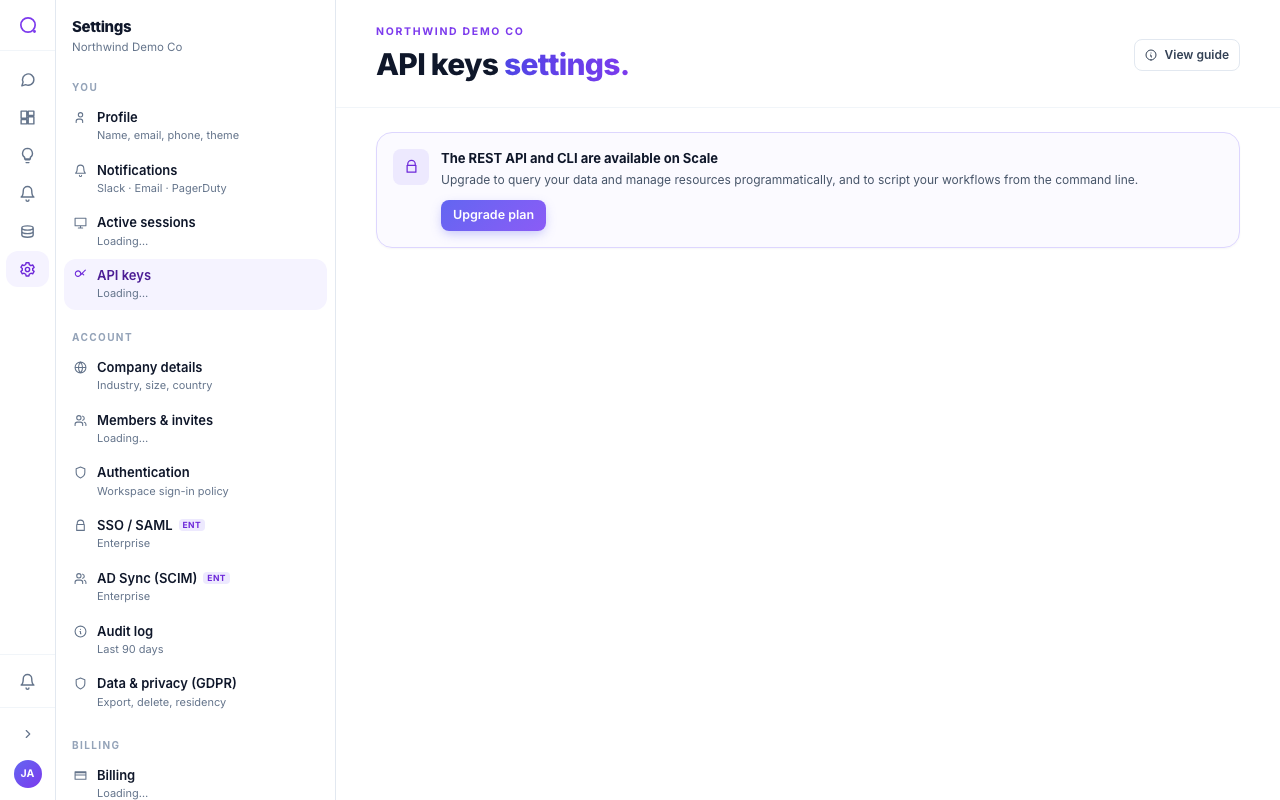
You need the Scale plan (or higher) and an account admin role to create or revoke keys. On a lower plan the page shows only an upgrade prompt. Any member who can view the page can see existing keys, but never their secrets.
Mint a key
- Click Create key
On the API keys page, click "Create key" to open the dialog.
- Name it
Give the key a clear name (for example "Production ETL" or "Reporting script") so you can recognise it later in the list.
- Choose its scopes
Pick what the key may do (see Choose scopes). Leave both selected for full access. You must select at least one.
- Create and copy the secret
Click "Create key". The full secret (starting
qg_live_) is shown once. Copy it immediately and store it in a secret manager. After you close the dialog only the prefix is ever shown again.
Treat keys like passwords. Store them in a secret manager, never in client-side code or a public repository, and revoke any key you suspect is exposed. If you lose a secret you cannot recover it: revoke the key and mint a new one.
Choose scopes
Scopes limit what a key can do. Grant the minimum a key needs.
| Scope | Grants | Example endpoints |
|---|---|---|
| Ask data | Run questions against your data | POST /v1/ask |
| Read resources | List and read your resources | GET /v1/dashboards, /v1/metrics, /v1/conversations, /v1/data-sources |
Leaving both selected gives the key full access. A key that calls an endpoint
outside its scopes gets a 403 with an insufficient_scope error that names
the scope it is missing.
Use your key
Pass the key as a bearer token in the Authorization header on every request.
The API keys page shows a ready-to-run example with your own host; replace the
host below with the one shown there.
curl https://app.queringo.com/v1/ask \
  -H "Authorization: Bearer qg_live_..." \
  -H "Content-Type: application/json" \
  -d '{"question": "MRR last 30 days by plan"}'
To check which key is calling and what it can do, use the introspection endpoint. It works on any plan, even when the REST API itself is not enabled:
curl https://app.queringo.com/v1/whoami \
  -H "Authorization: Bearer qg_live_..."
Available endpoints
| Method and path | Scope | What it does |
|---|---|---|
POST /v1/ask | Ask data | Ask a question in plain English and get the SQL, rows, and an insight back. Optional model_tier is low, medium, or high. |
GET /v1/conversations | Read | List recent conversations. |
GET /v1/dashboards | Read | List dashboards. |
GET /v1/dashboards/{id} | Read | Read a dashboard's document. |
GET /v1/dashboards/{id}/widgets/{key}/data | Read | Read cached data for one widget. |
GET /v1/metrics | Read | List metrics. |
GET /v1/data-sources | Read | List connected data sources. |
GET /v1/whoami | none | Identify the calling key and its scopes. |
The full machine-readable spec (OpenAPI 3.1) is published at /v1/docs.
From the command line
The CLI authenticates with the same qg_live_ key. Install it with pip or
brew, then:
queringo login --base https://app.queringo.com --api-key qg_live_...
queringo query "MRR last 30 days by plan"
queringo sources list
queringo dashboards pull <dashboard-id> > dashboard.json
See the CLI guide for the full command reference.
Rate limits
Each key is rate limited per minute, and the cap scales with your plan. The cap for your current plan is shown on the API keys page next to your active keys.
| Plan | Requests per minute, per key |
|---|---|
| Starter | 60 |
| Growth | 600 |
| Scale | 6,000 |
| Enterprise | 60,000 |
Exceeding the cap returns a 429 response with a Retry-After header. Clients
should back off and retry after the window resets.
Track usage and revoke
The keys table shows each key's name, secret prefix, scopes, and when it was last used, so you can spot stale or unused keys. To disable a key, click the revoke (trash) icon next to it. Revocation is immediate: the next request with that key is rejected, so a leaked key can be killed at once. Revoked keys drop out of the active list.
Troubleshooting
401 Unauthorized
The key is missing, malformed, or has been revoked. Confirm the Authorization
header is exactly Bearer qg_live_... and that the key is still active in the
list. Revoked keys always return 401.
402 Payment Required
Your account is not on a plan that includes the REST API. The response body has
"limit": "rest_api". Upgrade to Scale (or higher) to enable /v1. whoami
keeps working so you can still introspect a key.
403 insufficient_scope
The key does not have the scope the endpoint needs. The body names the
required_scope. Mint a new key with that scope (you cannot edit a key's scopes
after creation).
429 Too Many Requests
You hit the per-minute rate limit for your plan. Honour the Retry-After
header and slow your request rate, or upgrade for a higher cap.
I lost the secret
Secrets are shown only once and cannot be recovered. Revoke the key and create a new one.
Create key is disabled
You are on a plan below Scale, or you are not an account admin. Upgrade the plan, or ask an account admin to create the key.
Where these keys work
The same key authenticates every public surface (availability depends on your plan):
- REST API
- CLI
- MCP server (Scale and above)
- Webhooks (Scale and above)
- Embed SDK (Enterprise)
What's next
See Company details for account-level settings, or the REST API reference for the full endpoint list.