Correcting a wrong answer
Tell Queringo when an answer used the wrong table or logic, and optionally teach it the right table for similar questions.
When an answer looks wrong, you can tell Queringo what went wrong and, if you know it, point it at the right table. Your feedback improves future answers and, when you choose, is shared with your workspace.
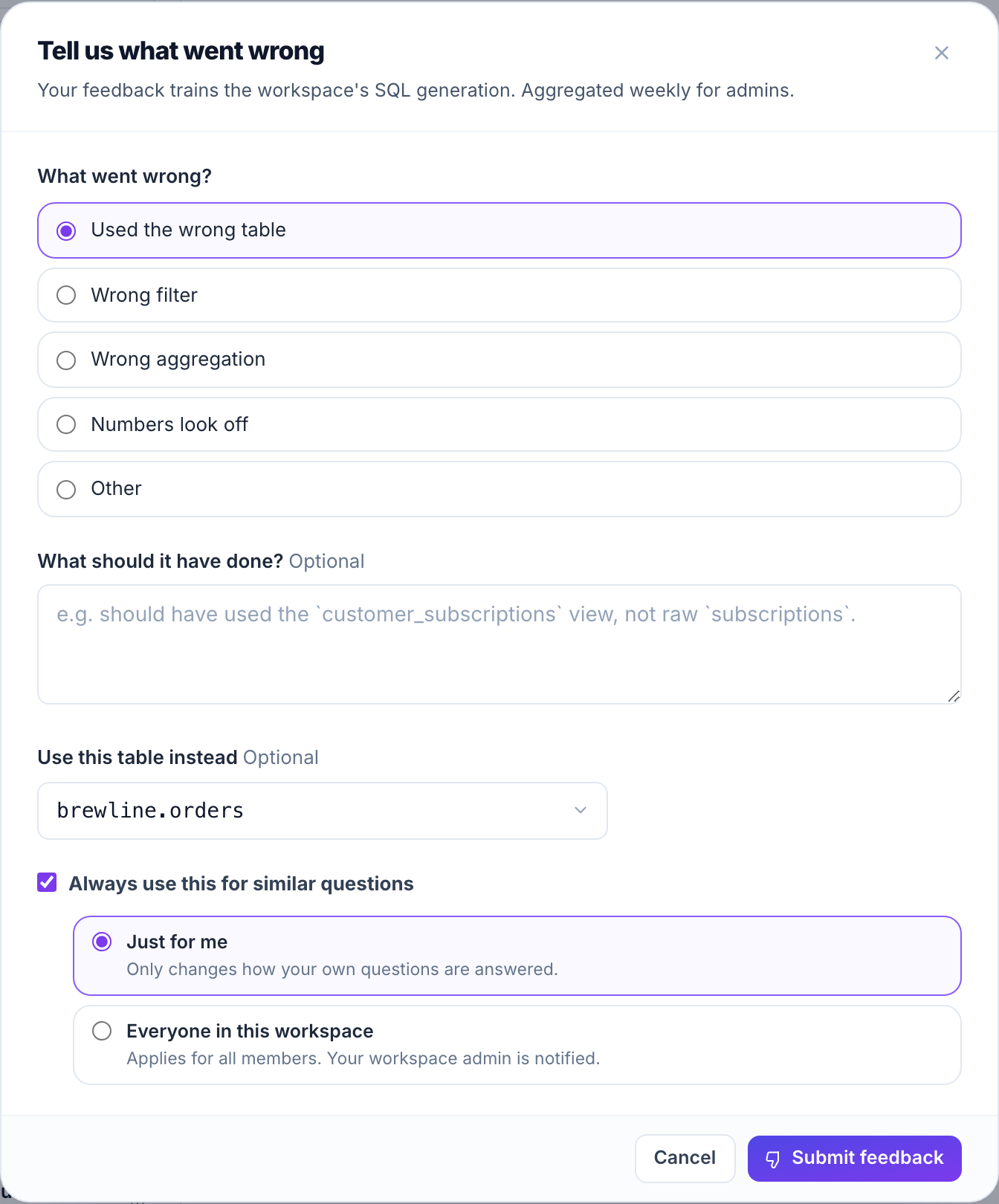
Give feedback on an answer
- Mark the answer down
Under any answer, select the thumbs-down control to open the feedback dialog.
- Say what went wrong
Pick a reason: wrong table, wrong filter, wrong aggregation, numbers look off, or other. If you pick "Other", a short description is required.
- Suggest the right table (optional)
Open "Use this table instead" and choose the table the answer should have used. The list shows the real tables in this conversation's data source, so you can only pick one that exists.
- Choose who it applies to (optional)
Tick "Always use this for similar questions" to teach the mapping, then choose the scope:
- Just for me changes only how your own questions are answered.
- Everyone in this workspace applies for all members, and notifies your workspace admin.
- Submit
Select Submit feedback. You will see a confirmation, and if you taught a mapping it is saved to learned preferences.
You can give feedback without teaching a mapping. Leave "Always use this for similar questions" unticked to send just the reason and notes.
What "Always use this" does
A taught mapping links the kind of question you asked to the table you picked. The next time you (or, for a workspace mapping, anyone) asks a similar question, Queringo gives that table priority. Asking again and confirming the same mapping strengthens it.
Workspace mappings affect everyone, so use them when the table is the right default for that kind of question. For a personal preference, keep it to "Just for me".
Where it goes
Taught mappings appear under Learned preferences, where workspace admins can review and clear them. Personal ("Just for me") mappings are visible only to you. The question text is stored encrypted.
Troubleshooting
- The table I want is not in the list. Only tables exposed to Queringo in the conversation's data source appear. Ask a workspace admin to expose it in the source's schema settings.
- "Always use this" is greyed out. Pick a table first; the option enables once a table is selected.
- My workspace mapping did not change an unrelated question. Mappings apply only to questions similar to the one you gave feedback on, not to every query.